Need for Caching
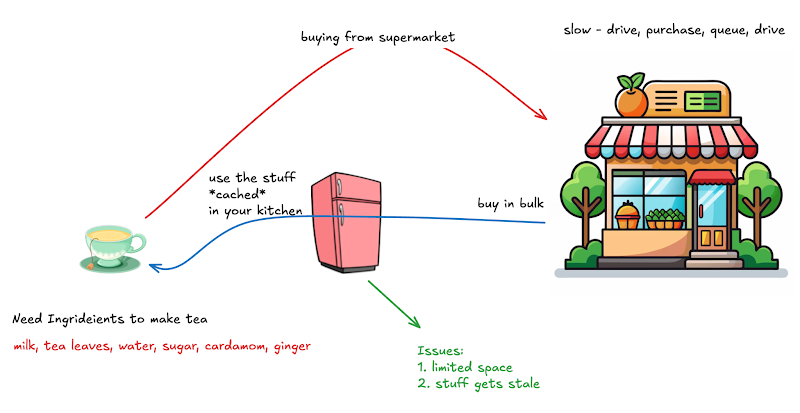
Making Tea
Human Brain
- Working memory: extremely fast, only hold 4-7 items, volatile + random access
- Short term memory: very fast, hold thousands of items, volatile (slightly longer duration - up to weeks) + random access
- Long term memory: extremely slow, practically unlimited, permanent
- when you go to sleep (REM), your brain consolidates your short-term memory into long-term memory + sequential access
Even biological memory is hierarchical!
Computer Memory
- CPU Registers
- this is what the CPU actually interacts with
- very small (few bytes)
- cpu registers work at clock-tick speed
- 0.2 ns per access (5 billion ops/sec)
- Cache (inside the CPU) - L1, L2, L3
- L1, L2: exist per core
- L3: shared across all CPU cores
- Main memory (RAM) is almost 500x - 1000x slower than CPU registers
- 100ns (traditionally)
- modern DDR4 RAMs have a random read latency of ~10ns
- HDD (magnetic disk drive): 100,000x slower than the RAM
.png)
.png)
How storage works
- Latency numbers: Latency Numbers Every Programmer Should Know
- Magnetic: How do Hard Disk Drives Work? 💻💿🛠
- Solid State: How do SSDs Work? | How does your Smartphone store data? | Insanely Complex Nanoscopic Structures!
- RAM: How does Computer Memory Work? 💻🛠
- (extra) Brain:
- Information Storage and the Brain: Learning and Memory
- How We Make Memories: Crash Course Psychology #13
- Tools to Enhance Working Memory & Attention
- Optimizing code for efficient cache usage: CppCon 2016: Timur Doumler “Want fast C++? Know your hardware!"
Memory is always hierarchical
- Larger memory storages will be slower compared to smaller ones
- if you have to produce a lot of something, you will use cheaper technology
- because registers of the size of RAM will be way too expensive
- larger storages are typically slow in sequential access and ultra slow in random access
- Smaller storages are generally faster and have better random access
Therefore, you have a need for caching
Web Memory Hierarchy
Browser (client side)
Not accessible to the frontend dev
- DNS cache (chrome://net-internals/#dns)
- File/Media Cache
Accessible to the frontend dev
- Cookies: 4KB
- Session Storage: 5MB
- Local Storage: up to 10MB
- IndexedDB: up to 10GB
JavaScript Cookies vs Local Storage vs Session Storage
Content Delivery Network (CDN)
Akamai, Fastly, Cloudflare, Cloudfront, Cloudinary, …
CDNs are the backbone of the internet
CDNs are neither client side, nor backend side. They're a 3rd party service (like DNS)
.png)
Q: What type of data does a CDN cache?
Large (> 10kb), mostly static (changes rarely) data
- multimedia: images, audio, videos, pdfs, zip, ...
- code: js, html, css
Any user-content (images/videos/reels/avatars uploaded by the users) will be served via CDNs
Q: What problem do the CDNs solve?
They act as a cache + They reduce latency
Imagine that you’re trying to watch a video (Scaler lecture recording)
Scaler servers are in Mumbai (South East Asia availability zone in AWS). Imagine that you’re living in US.
What is the round-trip-time from US to India?
circumference of earth: 40,000 Km
speed of light (in vacuum): c = 299792458 m/s ~ 3*108 m/s
but inside fiber optic cables, the speed of light is lesser: ~2 * 108 m/s
round trip time for a packet to go from India to US and back:
40,000 KM / (2 * 108 m/s)
= 4 * 104 * 103 m / (2 * 108 m/s)
= 4 / (20) seconds
= 200 ms
It takes at-least 200ms for a packet to make the US–India–US trip (in reality, it will be closed to 500-600ms)
This means that if you’re fetching the data from far away, there will be higher latency.
Also, if you’re fetching the data from far away, the bandwidth will be also be slower
- multiple hops — your bandwidth is limited by the slowest server in the route the data takes
- Intercontinental fiber optic cables handle trans-atlantic/trans-pacific data – they connect various continents & countries. All the network traffic across these continents travels over these cables
- these cables are a bottleneck
Bandwidth = Bytes / seconds
Latency = delay b/w sending the request and receiving a response
What if instead of streaming from video from the Indian servers, you could get that video from a server near your home!
- very low latency (a few ms)
- bandwidth will be much higher
Edge: close to the user
Edge-node / edge-server: a server which is (physically/geographically) close to the user
If we could purchase 1,000,000 servers and place them all across the globe to act as caches, we could serve the data from a server closer to the user.
This is what CDNs do!
CDNs provide a global infrastructure of edge-nodes. They rent-out these servers to whoever wants to use it.
CDNs handle almost 70% of all the traffic on the internet!
.png)
Q. How can you find the IP address of the nearest CDN server (edge server)?
- GeoDNS: special type of DNS that can resolve the closest IP address based on the user's geographical location
- unfortunately, GeoDNS has low penetration — majority of the DNS servers do not support the GeoDNS protocols
- AnyCast: custom redirect that the CDNs provide to send you to the nearest server
Q: Are CDNs databases?
No — they’re a cache. They don’t “store” the data, they just temporarily hold it to “serve” it to the clients.
Any data that you add to a CDN must be backed by a file storage service like S3.
Q: Can our backend servers access the CDN?
No. Backend server will access it directly from the file storage (like S3).
CDNs are client-facing. CDNs are accessed only by the clients.
Note: there’s nothing stopping our backend server from making a file request to the CDN. It’s just a useless thing to do.
How does the CDN get the data in the first place?
Imagine that Abdul uploads a video
- Abdul makes a request to Facebook’s backend servers
- Starts uploading the video to their servers
- Facebook serves will store this video in a file storage (like S3)
- Facebook will store the metadata in some database (like Mongodb, like SQL)
- Facebook will hit the CDN servers and configure a URL
- Facebook → Akamai
- Please give me the CDN url for this database URL “s3.aws.com/1234/video.mp4”
- CDN will store this URL and give a unique CDN URL corresponding to it “cdn.akamai.com/a3b2fd5.mp4”
- CDN will store the mapping from its URL to the database URL internally
.png)
Imagine that Upinta wants to watch this video
- she will make a request to the facebook backend servers
- backend servers will return a HTML+JS+CSS page
<html>
<body>
<video src=”s3.aws.com/1234/video.mp4” />
<video src=”cdn.akamai.com/a3b2fd5.mp4” />
</body>
</html> - Upinta’s browser will download the video from the URL embedded in the HTML file
- if the embedded URL is the database URL, then Upinta might be located far away from the database servers — her download speed will be slow and her latency will be high
<video src=”s3.aws.com/1234/video.mp4” /> - Instead, if the embedded URL is the CDN URL, then Upinta will be able to get the video from the edge-server which is closest to her
- this means that the backend server must embed the CDN url instead of the database URL in the response page
- CDN’s edge node will get the request for the CDN URL “cdn.akamai.com/a3b2fd5.mp4”
- Edge node will check whether it has the file cached locally
- if yes, then just serve the file
- if not,
- find the database URL
- fetch the video from the database
- cache it locally in the CDN’s edge server
- serve it
.png)
Pankaj also wants to watch the video, and Pankaj is Upinta’s neighbor
- Pankaj makes a request to the Facebook backend
- HTML file with CDN url
- Pankaj’s browser tries to download from CDN edge server
- this time around, the edge server has the file cached!
- because Upinta just watched it
- CDN server will just serve the file
Q: When does the CDN actually cache the file from the DB?
- When the CDN is informed about the file by the backend server
- When the first user makes the first request to fetch the file
- When the 2nd request for the file comes, then the CDNs actually store it in their cache!
- CDNs have found out that 70% of all URLs are 1-hit wonders – they are accessed once, and then never again forever!
- The companies are also smart.
- Media.net is an ad-tech platform — we serve ads to you
- Ads must load very quickly
- Ads are static content (images/videos) — served via CDN
- When we told the CDN about any URL, we would make 2 fake requests to the CDN so that it would be forced to cache it
- we would make these request from multiple countries, so that it caches it everywhere
Note that the CDN will definitely fetch the file from the DB for the first and second request (because how else will it get the file?)
But it will only cache it (storing it locally in its server) on the 2nd request.
Q: Can the CDN be a bottleneck?
No! Because CDNs have 100s of millions of servers distributed all across the globe
(optional references)
- Basics:
- https://aws.amazon.com/what-is/cdn/
- https://www.akamai.com/glossary/what-is-a-cdn
- https://www.cloudflare.com/learning/cdn/what-is-a-cdn/
- AnyCast: https://www.cloudflare.com/learning/cdn/glossary/anycast-network/
- Quick setup guide: https://www.sumologic.com/blog/cdn-aws-cloudfront/
- CDN Cache Invalidation:
- Some crazy CDN Stats (as of 2025)
- Total CDN bandwidth (all CDNs combined) exceeds 10 Peta bits per second (that's 10 million GBps)
- Total CDN storage exceeds 1 Zetta bytes (Giga < Tera < Peta < Exa < Zetta)
- Akamai alone handles > 3 Exa bytes per day!
- 70% of all internet traffic is handled by CDNs
Backend Cache
.png)
Local vs Global
- Global:
- exists as a separate layer b/w the app server and the DB
- all app servers can access this cache
- for example, a Redis cache (or a redis cache cluster)
.png)
def get_user_preferences(request):
user_id = request.user_id
preferences = redisClient.getKey(‘pref:user_id’)
if preferences is None:
preferences = sqlClient
.getPreferencesForUser(user_id)
redisClient.setKey(‘pref:user_id’, preferences)
return preferences
- Local:
- each app server can locally cache data inside its RAM/HDD
- app servers are not allowed to access the cache of other app servers (the cache is local & private to each app server)
- since the app servers are now storing data, it might make the app servers stateful (depending on how we use the cache)
- which means that application LB might have to use consistent hashing
.png)
user_preferences_cache = {} // stored in the RAM
def get_user_preferences(request):
user_id = request.user_id
preferences = user_preferences_cache.getKey(‘pref:user_id’)
if preferences is None:
preferences = sqlClient
.getPreferencesForUser(user_id)
user_preferences_cache.setKey(‘pref:user_id’, preferences)
return preferences
Single vs Distributed (only for Global caches)
Distributed cache: if a single cache server is not enough (we want to store more data in cache, or, we want to improve the read throughput), then we will use a distributed cache
Note: Single vs Distributed is only about global cache — because a local cache is inherently distributed (because each app server acts a cache, and there's multiple app servers)
.png)
Basically, you can have 3 types of caches
- Local cache (automatically distributed)
- Global Single cache (like a single Redis server)
- Global Distributed cache (like a cluster of Redis servers)
Q: What Routing Algorithm should the LB of a distributed cache use?
Distributed: local (inherently distributed), or a global distributed
The answer depends on why we decided to use a “distributed” cache.
- Either the data was too large to fit on 1 server
- This means that we “sharded” the data across the various cache servers.
- Different cache servers have different data.
- So, we should use Consistent Hashing
- The number of requests was too large to be handled by 1 server.
- This means that we “replicated” the data across the various cache servers.
- Different cache servers have the same data.
- So, we should use Round Robin.
Challenges with Caching
- Limited space: caches are much smaller (compared to the DB)
- since it is small, it can get full
- if the cache is full, and you still want to insert a new entry in the cache - you must first "evict" something from the cache
solution: Cache Eviction - Note: cache eviction happens during writes
- Stale data: cache is not the source of truth - the database is the source of truth
- it is possible for the data to get updated in the database, but not in the cache
- then, the data inside the cache will be "stale" (old)
- you must detect when data is old, and you must "invalidate" the data (& remove it from the cache)
solution: Cache Invalidation - Note: cache invalidation happens during reads (lazily)
Q: Should we do eviction, or should we do invalidation?
Both!
Both the cache invalidation algorithm and the cache eviction algorithm are always running together - each solves one problem.